This Guide Includes Units 1 Through 10
Named location in computer memory.
Stores data for use in application.
Java is statically typed, meaning variables must be declared, with a data type, before they are used.
int counter;
counter is a variable, able to store the data type referenced as int.
boolean isValid;
isValid is a variable, able to store the data type referenced as boolean.
Descriptive term, indicating what can be done with data, how much space required to store it. For instance int and double variables can be divided, added, multiplied. The boolean data type describes variables that can store one of two values, true or false. Basic data types in AP Computer Science curriculum (A) are int, boolean and double.
The int data type - 4 bytes, whole numbers from -2,147,483,648 to 2,147,483,647.
The double data type - 8 bytes, fractional numbers, 15 decimal digits.
A data type of known storage requirement, like int, boolean, double.
The int data type takes up 4 bytes of storage and represents whole numbers from -2,147,483,648 to 2,147,483,647.
The double data type takes up 8 bytes of storage and represents fractional numbers. Sufficient for storing 15 decimal digits.
The boolean data type only requires 1 bit but in practice may be take up a byte or nybble.
Think of a reference as the starting memory location for storing data of an unpredicted size
A non-null reference requires an allocation of memory, involving some initialization, or the use of the new operator.
Primitive Data type having only values of either true or false. Named for Boolean logic, a branch of mathematics developed by George Boole, an Anglo-Irish mathematician.
A boolean variable can be used to store a value of true or false, this making the boolean data type useful for conditionals.
boolean isSenior = age > 65;
If age is 67, then isValid is true. If age is 45 then isValid is false.
Primitive numeric data Data type.
Occupies 32 bits, or 4 bytes, and can store numbers from -2 31 to 231 - 1. Whole numbers only.
Primitive numeric data Data type.
Occupies 64 bits and can store numbers from -263 to 264 - 1. Fractional parts included.
Data that is passed to a method.
Formal parameters are described in method defintion, actual parameters are passed to method in calling code.
rate and balance are formal parameters,
public double interestCalculated(double rate, double balance) { ...
}
... actual parameters are in the call,
double interest = interestCalculated(0.03, 12000);
A symbol used to perform an operation,
| addition | + |
| subtraction | - |
| multiplication | * |
| division | / |
| modulo | % |
| equality | == |
| assignment | = |
A variable, value of which cannot be changed after initialization. Commonly represented in uppercase. Indicated with keyword final.
final int GOAL_HEIGHT = 8;
A template for creating an object or instance.
A data model created from a class.
A way to 'temporarily convert' or represent data as another type. For example,
double height = 34.5;
int val = (int) height; // This is a narrowing conversion
int width = 5;
double side = (double)width; // This is a widening conversion
Note, when an int is typecast to a double, information is not lost. However, when a double is typecast to an int, the fractional part is truncated.
Object Oriented Programming. A software engineering paradigm (technique) in which templates called classes are used to create data models called objects. The application is built around the objects.
The 4 tenets of OOP are
☐
Abstraction -
Big ideas as classes & objects,in OOP framework
☐ Polymorphism -
Different objects responding in specialized ways
to same request
☐Inheritance -
Reuse of class code base in parent class, by child class
☐Encapsulation -
Subsuming data & logic inside class/object
Software template from which data models called objects created
A class specifies
| Attributes | Features/characteristics of class or object |
| Methods | Blocks of code, specify what the class or object can do |
A Class, SoccerPlayer, is instantiated (newed up) to create an object, player.
SoccerPlayer player =
new SoccerPlayer("Harry Kane", 26, "Forward", "Spurs");
Data model created from software template called class. An object (instance) is 'instantiated' or 'newed up' from a class.
An object has
| attributes | properties of the object |
| instance methods | blocks of code that can be called on the object, and describe what the object can do |
Instance must be newed up before instace data or methods can be accessed.
Keyword, this refers to the current object.
Below, this is used to set the value of an attribute to the value passed into the block of code.
public class SoccerPlayer {
private int age;
...
public void setAge(int age) {
this.age = age;
}
}
Characteristic of an object or a class. Other terms - instance variable, class variable, property, data member, instance data, class data
// age is an instance variable, club is a class or static variable public class SoccerPlayer {
private int age;
static String club = "Spurs"; ...
public int getAge() {
return this.age;
}
}
SoccerPlayer player =
new SoccerPlayer(....);
int playerAge = player.getAge();
String clubName = SoccerPlayer.club;
Block of code, given a label, bound to object (instance method), or class (class method).
A method is described as something the object can do.
public class SoccerPlayer {
private int age;
...
public void messageCoach() {
...
}
public static String codeOfConduct() {
System.out.println("Practice hours are reserved ...")
}
}
SoccerPlayer player = new SoccerPlayer();
player.messageCoach();
SoccerPlayer.codeOfConduct();
Special method, instantiates or 'news up' object from class.
If no constructor is defined, the default constructor can be used. This constructor is defined at Object level. Once a constructor is defined in the class, the default constructor can no longer be used.
public SoccerPlayer(String name, int age,
String position, String club) {
this.name = name;
this.age = age;
this.position = position;
this.club = club;
}
Method, returns the value of a private attribute
Attributes are declared private in order to protect them from direct access. Therefore methods that are public get the value of the attribute.
public class SoccerPlayer {
private String name;
...
public String getName() {
return this.name;
}
The accessor or getter returns the value of the attribute, the return type mirrors the type or class of the attribute.
Method, sets value of a private attribute.
Attributes are declared private to protect them from direct access. Therefore methods that are public are necessary to set the value of the attribute.
public class SoccerPlayer {
private String name;
...
public void setName(String newName) {
this.name = newName;
}
Mutator or setter does not have a return, parameter mirrors the type or class of the attribute.
Redeclaration of existing method, with different parameter list.
|
public SoccerPlayer() { .... } public SoccerPlayer(String name, int age) { this.name = name; this.age = age; } |
| public void requirements() { .... } public void requirements(SoccerPlayer player) { .... } |
Govern visibility of class, method, attribute.
private gives access only within class, public gives access outside of class. Other accessibility modifiers, outside scope of course.
public class SoccerPlayer {
private String name;
...
public String getName() { return name; }
Client code can new up an instance of the SoccerPlayer class, but cannot directly access name attribute because it is private, instead, must call the getName() method, which is public.
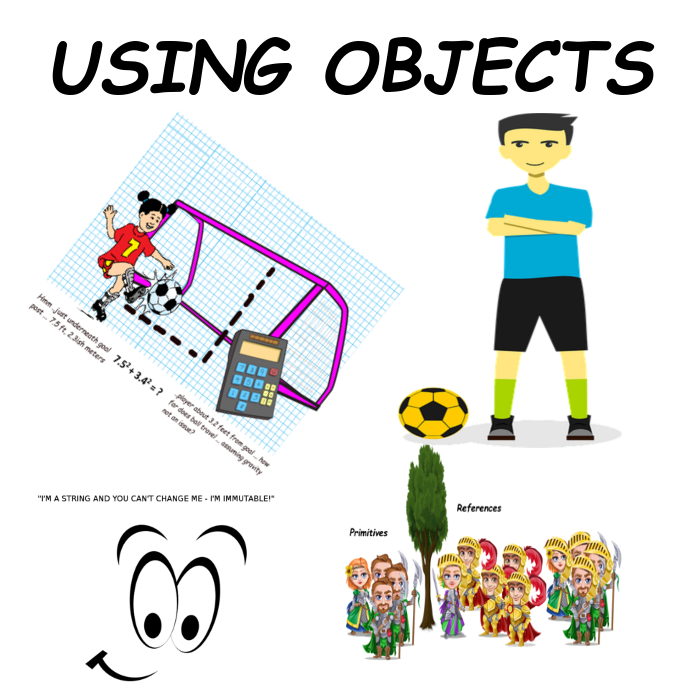
Class Java uses to represent String instances - strings are a bunch of characters, like "Robbie Roe". String is a reference type, used to create an instance. String instances can be created using the new operator,
String str1 = new String("Have a great day!");
... and by using String literals, String str2 = "Have a great day!";
String methods: length(), indexOf(..), substring(..), equals(..), compareTo(..)
String instances are immutable, you cannot change them. When you 'change' aString instance, a new String instance is created.
This keyword indicates that an attribute or a method s bound to a class, not an object. As such, no instantiation is required to access the static quantity. For example,
public class SoccerPlayer {
...
static int numberOfPlayers;
}
In the client code,
int playersTotal = SoccerPlayer.numberOfPlayers;
Derived from the creator of Boolean Algebra, George Boole, the term refers to outcomes having values of either true or false, nothing else.
Boolean algebra is the basis of the design of digital computer circuits, and is central to the flow of logic in a computer program.
Logical statement that is either true or false.
Like,
goals > 15
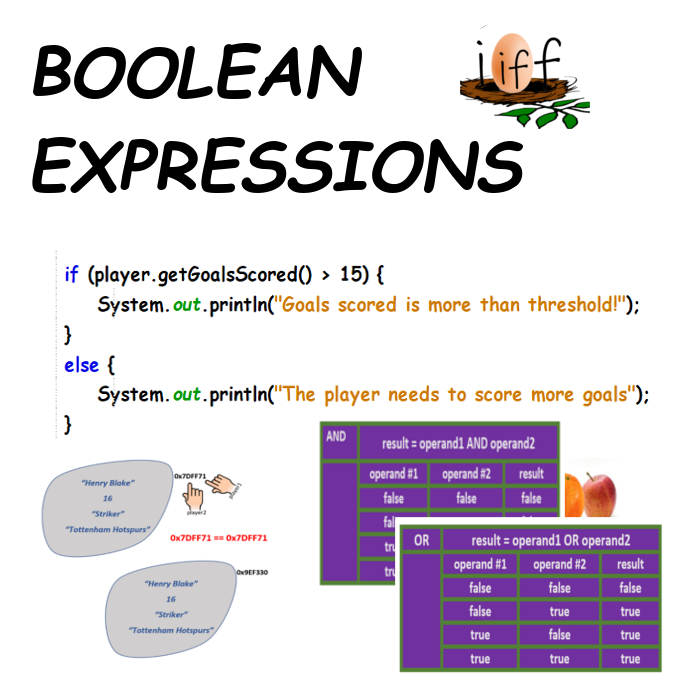
Compound boolean expressions are composed of singleton expressions joined by Boolean operators, like AND(&& in Java), OR (|| in Java).
| boolean isSeniorKeeper = (age > 21) && (position.equals("Keeper"); |
| boolean isValidPlayer = (club.equals("Training") || (club.equals("Spurs"); |
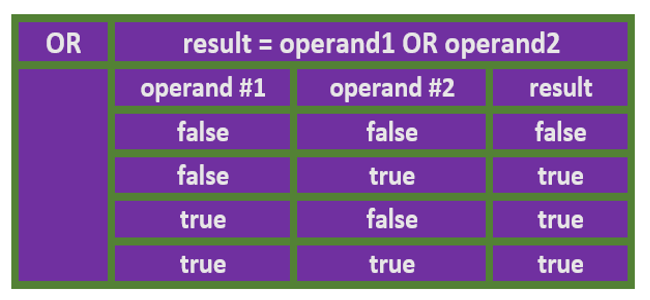
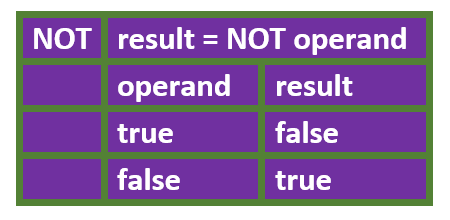
Operators that act on boolean variables.
The 3 basic Boolean operators are
| AND (Java, &&), |
| OR (Java, ||) |
| NOT (Java, !) |
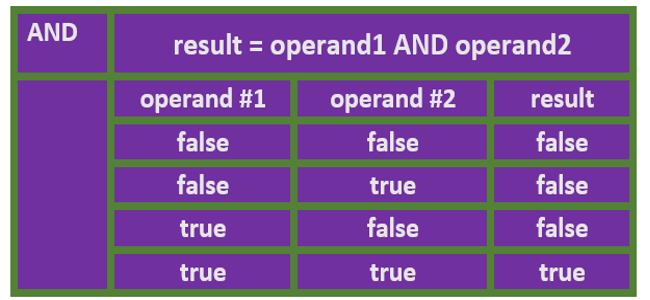
Boolean operators have associated truth tables that map the values of the operands to the result when the Boolean operator is applied.
The AND operation is represented by && in Java. Only true if all operands are true.
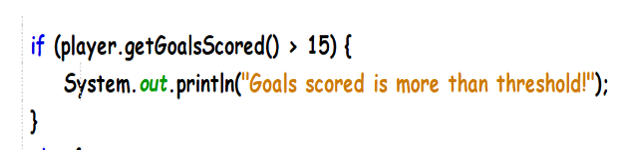
Statement that makes a single decision based on boolean expression.
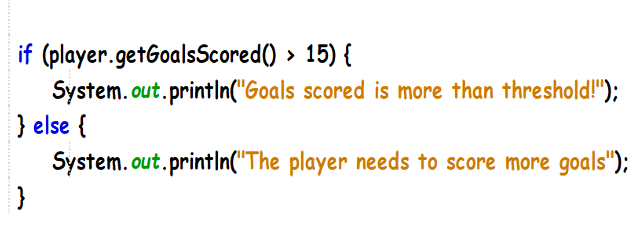
Statement that supports decision based on the value of a boolean expression, and a single alternative.
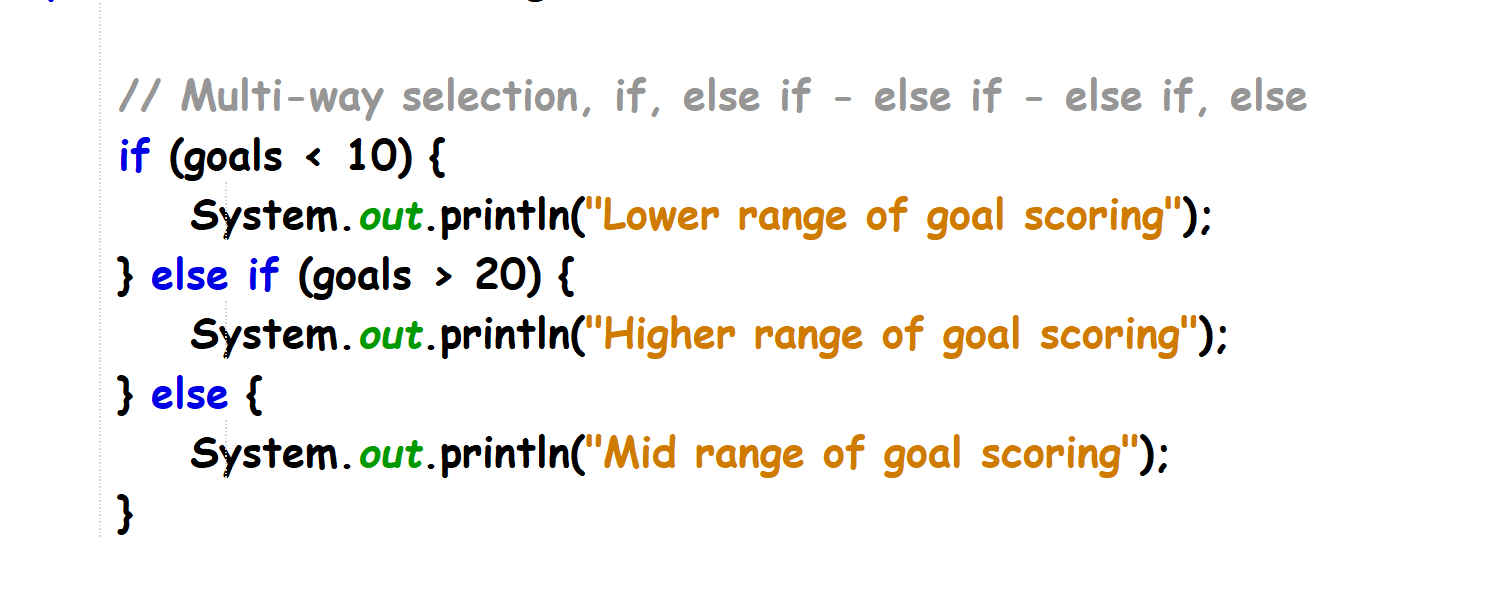
Statement supporting multiple decisions based on value of multiple boolean expressions.
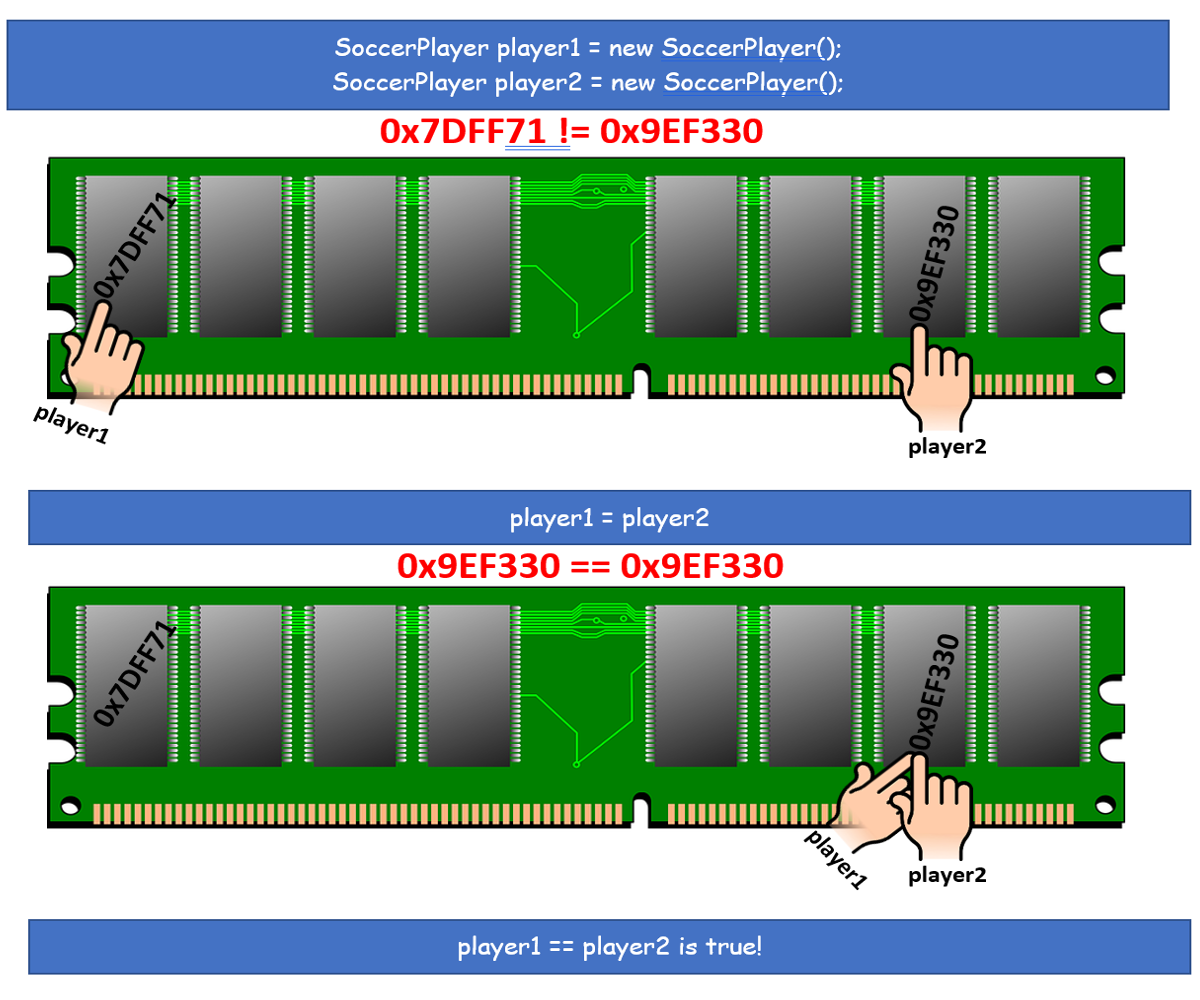
Two objects are aliases of each other if they refer to the same memory location. In the diagram, player1 and player2 end up as aliases.
Action that is repetetive, happens in a loop.
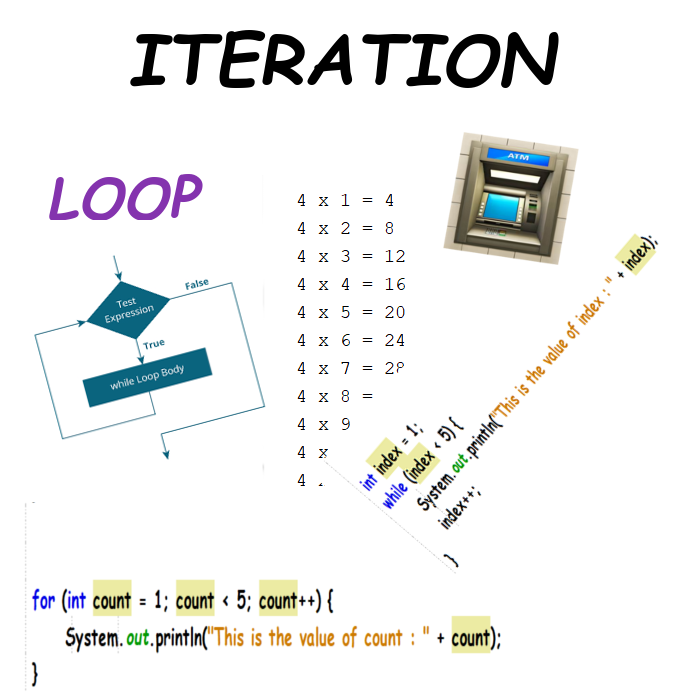
Iteration enables repeated execution of a block of code. Loop condition governs execution of the loop, and sentry variable or loop variable is changed each time through the loop. The loop variable forms a part of the loop condition and determines how many times the loop executes.
If a loop condition is always true, the loop never exits.
Term given to a construct in computer programming in which a block of code is repeated either a set number of times or infinitely.
A loop in computer programming enables the repeated execution of a block of code. Typically, a loop condition governs execution of the loop, and a sentry variable or loop variable is changed each time through the loop. The loop variable forms a part of the loop condition and determines how many times the loop executes.
If a loop condition is always true, the loop never exits.
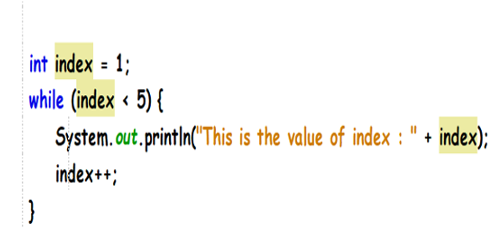
A specific loop that uses the while keyword, a loop variable (sentry variable) and a boolean expression, to govern how many times the loop is executed. Loop runs while the boolean expression (loop condition) is true.
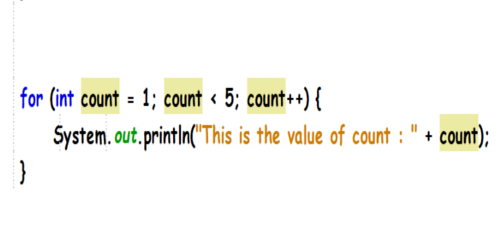
A specific loop that uses the for keyword, a loop variable or sentry variable and a boolean expression to govern how many times the loop is executed.
The for loop construct supports initialization and allows for specification of an action to be taken each time through the loop.
A loop that that does not have an exit point, the loop condition is always true - this results in a loop that cycles infinitely.
A software template in Object Oriented Programming.
Software models called objects (or instances) are made from a class, like an achitectural blueprint is used to build houses.
A class is a building block of Object Oriented Programming, OOP.
The 4 tenets of OOP are
☐Abstraction - Pulling out big ideas, forming classes
☐Polymorphism - Objects specializing responses to same request
☐Inheritance - Reuse of class as basis for another class
☐ Encapsulation - Subsuming logic, data inside class or object
Software model made from instructions in class. Also called instance. Object is instantiated, or 'newed up' based on class.
SoccerPlayer player = new SoccerPlayer();
Class is SoccerPlayer, player is object.
An instance may have instance variables and instance methods. Instance variables may be protected by accessibility modifier, viewed or changed by getters and setters.
public class SoccerPlayer {
private String name;
...
public String getName() {
return this.name;
}
Instance is a reference to an area of memory.
A characteristic or feature of a class or object. Attributes belonging to the instance are also termed
instance variable
data member
instance data
property
By convention, attributes protected with private accessibility modifier. Methods called Getters and Setters get and set attribute values from outside the class.
Below, name, instance variable. Keyword static indicates division, class variable.
public class SoccerPlayer {
private String name;
public static String division = "Premier League"; ...
public String getName() {
return this.name;
}
Block of code tied to object or class, given signature describing visibility (like public or private), return type and name.
public class SoccerPlayer {
private String name;
...
public String getName() {
return this.name;
}
public static associatedSport() {
return "Soccer aka European Football";
}
getName, instance method, called on the instance. associatedSport, class method, called on the class.
SoccerPlayer player = new SoccerPlayer();
...
String playerName = player.getName();
String sportCategory = SoccerPlayer.associatedSport();
Special method, instantiates new object based on class. Constructor described as empty constructor if no parameters, and parameterized constructor if it has a parameter list.
public class SoccerPlayer {
private String name;
....
public SoccerPlayer() {
}
public SoccerPlayer(String name, int age) {
this.name = name;
this.age = age;
}
Constructors are called when object is newed up from class,
SoccerPlayer player = new SoccerPlayer();
SoccerPlayer player2 = new SoccerPlayer("Harry Kane", 27);
These constructors are overloaded.
Feature of programming languages, supports storing and processing data, showing relationships.
Examples - arrays, Arraylist objects, 2 Dimensional arrays.
| item #1 | item #2 | item #3 |
| 00 | 01 | 02 |
| 10 | 11 | 12 |
| 20 | 21 | 22 |
Data structures facilitate data manipulation and processing.
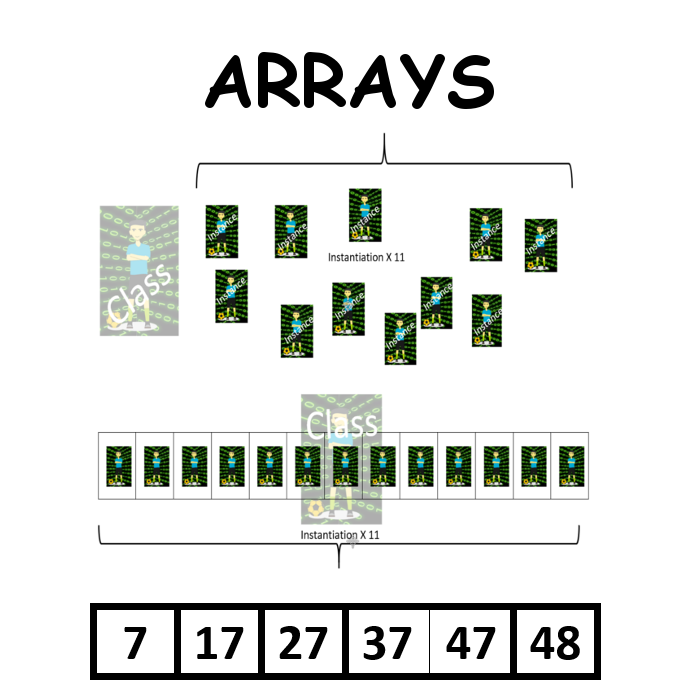
Data structure that stores a collection of elements, each identified by an array index.
Arrays are declared with the data type or class, and must be newed up with the new operator, or initialized with an initialization list or initializer list.
String[] values = {"item #1", "item #2", "item #3"};
or
String[] values = new String[3];
values[0] = "item #1";
values[1] = "item #2";
values[2] = "item #3";
Arrays are used to store multiple quantities, representing a programming convenience and alternative to declaring and managing multiple variables.
A whole number valid in range 0 to 1 less than the length of the array. Identifies array element.
| item #1 | item #2 | item #3 |
| index 0 - | index 1 - | index 2 |
Condition, index less than 0 or greater than or equal to number of array elements.
| item #1 | item #2 | item #3 |
| index 0 - | index 1 - | index 2 - | index 3 !!! |
Use the length property of Array to ensure that only valid index values are used.
0 <= index < array.length
Entity (primitive or object) array contains, identified by array index.
int[] nums = {1,222,23};
| 1 | 222 | 23 |
| numbers[0] is 1, the array element at index 0 is 1 |
| numbers[1] is 222 |
| numbers[2] is 23 |
Sequencing through the elements of array, typically using a loop.
| while index within bounds use index to access array element change value of index |
|
|
|
int[] numbers = new int[100]; for (int index = 0; index < numbers.length; index++) { System.out.print(numbers[index]); } |
|
int[] numbers = new int[100]; int index = 0; while (index <numbers.length ) { System.out.print(numbers[index]); index++; } |
Loop, sequences through a collection, an array, referring to the items in the array in sequence.
for (Item item : items)
process(item)
Note that Item represents either a primitive data type or a Class name, corresponding to the data type or object contained by the array.
Add elements to the array.
SoccerPlayer[] team = new SoccerPlayer[3];
| null | null | null |
| index 0 - | index 1 - | index 2 |
The array can be populated by direct assignments,
team[index] = new SoccerPlayer("Harry Kane", 26, "Forward","Spurs");
... or by using an initializer list when the array is declared, after newing up instances of the class,
SoccerPlayer[] team = {player1, player2, player3};
Search algorithm, sequences through array, comparing each element to target.
| item #1 | item #2 | item #3 | item #4 | ..... |
start at index 0
while (index in bounds) {
check if element at index equals target
if it does, take action,
else increase index
}
Search Algorithm, assumes sorted array. Splits array in half repetitively, to find target.
Looking for 55:
| 10 | 11 | 22 | 33 | 44 | 55 | 77 |
| 10 | 11 | 22 | 33 | 44 | 55 | 77 |
| 10 | 11 | 22 | 33 | 44 | 55 | 77 |
Sorting algorithm, relies on inserting subsequent items into sorted part of list. O(n2), Ω(n).
| 3 | -1 | 9 | 2 | 1 | 4 | 7 |
| 3 | -1 | 9 | 2 | 1 |
| -1 | 3 | 9 | 2 | 1 |
| -1 | 3 | 9 | 2 | 1 |
| -1 | 2 | 3 | 9 | 1 |
| -1 | 1 | 2 | 3 | 9 |
Sorting algorithm, swaps elements to sort list. O(n2), Ω(n2).
| 3 | -1 | 9 | 2 | 1 |
| -1 | 3 | 9 | 2 | 1 |
| -1 | 1 | 9 | 2 | 3 |
| -1 | 1 | 3 | 2 | 9 |
| -1 | 1 | 3 | 2 | 9 |
| -1 | 1 | 2 | 3 | 9 |
Big O.
Symbol describing worst case scenario in terms of swapping/comparing values in sort/search process.
| Linear Search | O(n) |
| Selection Sort | O(n2) |
| Insert Search | O(n2) |
| Binary Search | O(log n) |
Big Ω.
Symbol describing best case scenario in terms of swapping/comparing values in sort process.
| Linear Search | Ω(1) |
| Selection Sort | Ω(n2) |
| Insert Search | Ω(n) |
| Binary Search | Ω(1) |
Supports storing and processing data, showing relationships.
Examples - arrays, Arraylist objects, 2 Dimensional arrays.
| item #1 | item #2 | item #3 |
| 00 | 01 | 02 |
| 10 | 11 | 12 |
| 20 | 21 | 22 |
Data structures facilitate data manipulation and processing.
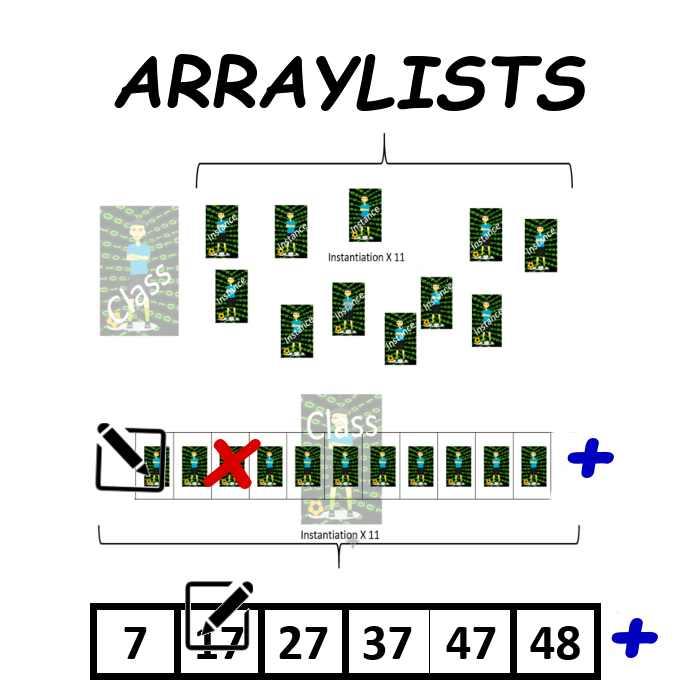
Data structure, stores collection of references, each identified by index. No primitives. Flexible, elements can be added, modified and removed.
ArrayLists declared with class ArrayList, newed up with new operator.
ArrayList class should be imported: import java.util.ArrayList;
ArrayList values = new ArrayList(); // An ArrayList instance of objects
ArrayList<String> strValues = new ArrayList<String>(); // .. Strings
ArrayList<SoccerPlayer> players = new ArrayList<SoccerPlayer>();
// .. SoccerPlayer instances
Populate the ArrayList using add method
strValues.add("item #1");
or, add multiple elements at once,
ArrayList
A whole number valid in range 0 to 1 less than the size of the array. Identifies array element.
Use the size() method to find the number of elements in the ArrayList.
| item #1 | item #2 | item #3 |
| index 0 - | index 1 - | index 2 |
Condition, index less than 0 or greater than or equal to number of ArrayList elements.
| item #1 | item #2 | item #3 |
| index 0 - | index 1 - | index 2 - | index 3 !!! |
Use the size method to ensure that only valid index values are used.
0 <= index < arrayList.size()
Condition, list item has been removed or changed in some manner, while also being accessed.
Typically happens when list item is accidentally removed by program code, and same element is being processed at the same time.
for (SoccerPlayer player : players) {
players.remove(player);
System.out.println(player.getName());
}
Take care when processing ArrayList elements!.
Entity (primitive or object) array contains, identified by array index.
ArrayList<Integer> numbers contains [1,22,23]
| 1 | 222 | 23 |
| numbers.get(0) returns 1, the list element at index 0 is 1 |
| numbers.get(1) returns 222 |
| numbers.get(2) returns 23 |
Sequencing through the elements of a list, typically using a loop.
| while index within bounds use index to access list element change value of index |
|
|
|
ArrayList<Integer> numbers= new ArrayList<Integer>(); // Next, 100 items added! for (int index = 0; index < numbers.size(); index++) { System.out.print(numbers.get(index)); } |
Loop, sequences through a collection, a list, referring to the items in the array in sequence.
for (Item item : items)
process(item)
Note that Item represents a Class name, corresponding to the object contained by the list.
Add elements to the list.
ArrayList<SoccerPlayer> team = new ArrayList<SoccerPlayer>();
team.add(new SoccerPlayer("Harry Kane", 27, "Forward", "Spurs"));
... or by using one of several tricks to populate the list, like,
ArrayList<SoccerPlayer> team = new ArrayList<>(Arrays.asList(player1, player2, player3));
Search algorithm, sequences through list, comparing each element to target.
| item #1 | item #2 | item #3 | item #4 | ..... |
start at index 0
while (index in bounds) {
check if element at index equals target
if it does, take action,
else increase index
}
Search Algorithm, assumes sorted array. Splits list in half repetitively, to find target.
Looking for 55:
| 10 | 11 | 22 | 33 | 44 | 55 | 77 |
| 10 | 11 | 22 | 33 | 44 | 55 | 77 |
| 10 | 11 | 22 | 33 | 44 | 55 | 77 |
Sorting algorithm, relies on inserting subsequent items into sorted part of list. O(n2), Ω(n).
| 3 | -1 | 9 | 2 | 1 | 4 | 7 |
| 3 | -1 | 9 | 2 | 1 |
| -1 | 3 | 9 | 2 | 1 |
| -1 | 3 | 9 | 2 | 1 |
| -1 | 2 | 3 | 9 | 1 |
| -1 | 1 | 2 | 3 | 9 |
Sorting algorithm, swaps elements to sort list. O(n2), Ω(n2).
| 3 | -1 | 9 | 2 | 1 |
| -1 | 3 | 9 | 2 | 1 |
| -1 | 1 | 9 | 2 | 3 |
| -1 | 1 | 3 | 2 | 9 |
| -1 | 1 | 3 | 2 | 9 |
| -1 | 1 | 2 | 3 | 9 |
Big O.
Symbol describing worst case scenario in terms of swapping/comparing values in sort/search process.
| Linear Search | O(n) |
| Selection Sort | O(n2) |
| Insert Search | O(n2) |
| Binary Search | O(log n) |
Big Ω.
Symbol describing best case scenario in terms of swapping/comparing values in sort process.
| Linear Search | Ω(1) |
| Selection Sort | Ω(n2) |
| Insert Search | Ω(n) |
| Binary Search | Ω(1) |
Supports storing and processing data, showing relationships.
Examples - arrays, Arraylist objects, 2 Dimensional arrays.
| item #1 | item #2 | item #3 |
| item #4 | item #5 | item #6 |
| item #7 | item #8 | item #9 |
Data structures facilitate data manipulation and processing.
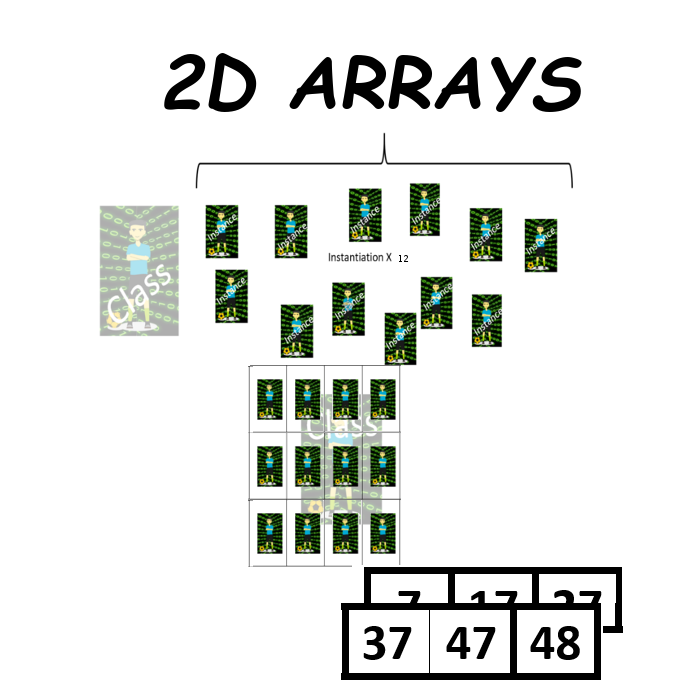
Matrix-like data structure that stores a collection of elements, each identified by a row index and a column index, see below, first digit represents the row, second digit represents the column. Elements can be primitives or references. This data structure is fixed in size.
| 00 | 01 | 02 |
| 10 | 11 | 12 |
| 20 | 21 | 22 |
2D arrays are declared with the type or class, a double set of square brackets, and must be newed up with the new operator, or initialized with an initializer list.
int[][] numbers = new int[3][3]; // 3 rows, 3 columns
int[][] numbers = {{1,2,3}, {4,5,6}, {7,8,9}}; // initializer list, 3 rows, 3 columns
SoccerPlayer[][] players = new SoccerPlayer[3][11]; // 3 rows, 11 columns
0 <row index1 < 2DArrayInstance.length
0 < column index < 2DArrayInstance[0].length
The length property gives the number of rows.
The length property of a row gives the number of columns.
int[][] numbers = {{1,2}, {3,4}, {5,6}, {7,8}};
numbers.length is 4, this is the number of rows.
numbers[0].length is 2, this is the number of columns
Condition,
Given 2D array, matrix,
row index < 0, or row index >= matrix.length
or
column index < 0, or column index >= matrix[0].length
| item #1 | item #2 | item #3 |
| item #4 | item #5 | item #6 |
| item #7 | item #8 | item #9 |
In the example above, the row index max value is 2, the column index max value is 2.
Use the length property to ensure that only valid index values are used.
Entity (primitive or object) array contains, identified by 2D array row and column index.
2D array, numbers, contains [[1,222,23], [2,333,33], [3, 444, 43]]
| 1 | 222 | 23 |
| 2 | 333 | 33 |
| 3 | 444 | 43 |
| numbers[0][0]] is 1, the list element at row 0, column 0, is 1 |
| numbers[1][2] is 33 |
| numbers[2][1] is 444 |
Sequencing through the elements of the 2D array, typically using a nested loop - like regular for, enhanced for, while.
|
iterate through the arrays iterate through each array use indices to access list element change value of indices |
|
int[][] numbers = new int[10][10]; // Next, 100 items added! for (int rowIndex = 0; rowIndex < numbers.length; rowIndex++) { for (int colIndex = 0; colIndex < numbers[0].length; colIndex++) { System.out.print(numbers[rowIndex][colIndex]]); } |
Loop, sequences through the 2D array. A nested loop is necessary.
Consider a 2D array of ints, bingoNumbers,
int[][] bingoNumbers = new int[15][15];
// Traverse the rows
for (int[] rowOfNumbers : bingoNumbers) {
// Traverse the columns
for (int number : rowOfNumbers) {
process(number);
}
}
Loop traversal crosses the rows, processes elements in each row in turn.
int[][] numbers = {{1,2,3}, {4,5,6}, {7,8,9}};
4 is the fourth value. Values are printed starting with first row, and traversing row, each time processing a value.
-----------------
| 1 → | 2 → | 3 → | 4 → |
-----------------
| 5 → | 6 → | 7 → | 8 → |
-----------------
| 4 → | 3 → | 2 → | 1 → |
-----------------
Loop traversal goes down columns, processes each element in turn.
int[][] numbers = {{1,2,3}, {4,5,6}, {7,8,9}};
2 is printed as the fourth value. Values printed starting with first column, traversing down column, each time printing a value.
-----------------
| 1 ↴ | 2 ↴ | 3 ↴ | 4 ↴ |
-----------------
| 5 ↴ | 6 ↴ | 7 ↴ | 8 ↴ |
-----------------
| 4 ↴ | 3 ↴ | 2 ↴ | 1 ↴ |
-----------------
Add elements to the 2D Array.
SoccerPlayer[][] teams = new SoccerPlayer[3][3];
teams[0][0] = new SoccerPlayer("Harry Kane", 27, "Forward", "Spurs"));
... or by using an initializer list, with SoccerPlayer instances,
SoccerPlayer[][] teams = {{player1, player2, player3},
{player4, player5, player6},
{player7, player8, player9}};
Search algorithm, sequences through list, comparing each element to target.
| item #1 | item #2 | item #3 | item #4 |
start at index 0
while (index in bounds) {
check if element at index equals target
if it does, take action,
else increase index
}
Software template in OOP
Software models, objects (or instances), are made from a class, as an achitectural blueprint is used to build houses.
Class, building block of OOP.
The 4 tenets of OOP are
☐ Abstraction - Pulling out big ideas, forming classes
☐ Polymorphism - Objects specializing responses to same request
☐ Inheritance - Reuse of class as basis for another class
☐ Encapsulation - Subsuming logic, data inside class or object
Software model made from class. Object is instatiated, or 'newed up' based on class.
SoccerPlayer player = new SoccerPlayer();
SoccerPlayer is the class, and player represents the object.
Instance may have instance variables, instance methods. Instance variables may be protected by accessibility modifier and may only be viewed or changed by methods called getters and setters.
public class SoccerPlayer {
private String name;
...
public String getName() {
return this.name;
}
An object is a reference to an area of memory.
Reuse by one class, subclass, of methods and properties of another class, superclass.
Inheritance is designated with keyword extends in Java.
Class, ChocolateChipCookie inherits from class PlainCookie. The subclass parameterized constructor calls super constructor.
public class PlainCookie {
private double qtyFlour;
// Other attributes, constructor, methods
}
public class ChocChipCookie
extends
PlainCookie {
private double qtyChocChips;
public ChocChipCookie(double qtyChocChips,
double qtyFlour,...)
{
super(qtyFlour, ...);
... }
Set of classes related via Inheritance.
PlainCookie is parent class of ChocChipCookie, which in turn is parent class of NutChocChipCookie.
IS-A relationship between subclasses and superclass. NutChocChipCookie IS-A ChocChipCookie, which IS-A PlainCookie.
Superclass or parent class reused by subclass or child class, via Inheritance.
PlainCookie is the parent class of ChocChipCookie, the parent class of NutChocChipCookie.
IS-A relationship exists between subclasses and superclass. NutChocChipCookie IS-A ChocChipCookie, which IS-A PlainCookie.
Subclass can redefine method from parent class. When method called from instance of subclass, method defined in subclass is called, thus overriding method in superclass.
public class PlainCookie {
....
public void displayBakeTemp() {
System.out.println("385 Fahrenheit");
}
public class ChocChipCookie {
....
public void displayBakeTemp() {
System.out.println("350 Fahrenheit");
}
PlainCookie cookie = new Cookie();
PlainCookie chocCookie = new ChocChipCookie();
chocCookie.displayBakeTemp(); //350 Fahrenheit displayed!
When objects (related via inheritance) respond in different ways to same request. Overriding methods is how Java does Polymorphism!
public class PlainCookie {
public void displayBakeTemp() {
System.out.println("385 Fahrenheit");
}
public class ChocChipCookie extends PlainCookie{
public void displayBakeTemp() {
System.out.println("350 Fahrenheit");
}
PlainCookie cookie = new Cookie();
PlainCookie chocCookie = new ChocChipCookie();
chocCookie.displayBakeTemp(); // 350 Fahrenheit is displayed!
cookie.displayBakeTemp(); // 385 Fahrenheit is displayed!
Casting to superclass, further UP in class hierarchy. Also known as generalization or widening.
public class PlainCookie {....}
public class ChocChipCookie extends PlainCookie{ ....}
PlainCookie chocCookie = new ChocChipCookie();
Implicit upcast done here, to superclass.
int quantityChips = ((ChocChipCookie)chocCookie).getQtyChocChips();
Upcasting can result in hiding specialized class' attributes/methods - can be resolved by casting to specialized class.
PlainCookie chocCookie = new ChocChipCookie();
Specialization or narrowing, casts instance of superclass to instance of subclass.
In Java, downcasting can cause Class Cast Exception - exception thrown when real object does not match class object being cast to.
public class PlainCookie {....}
public class ChocChipCookie extends PlainCookie{.... }
This causes incompatible types (classes) error,
ChocChipCookie cookie = new Cookie();
Explicit cast removes incompatible types issue, but causes Class Cast Exception at runtime.
ChocChipCookie cookie = (ChocChipCookie)new Cookie();
Downcasting is not allowed in Java, upcasting is!
Exception thrown at runtime when instance of superclass downcast to subclass.
public class PlainCookie {....}
public class ChocChipCookie extends PlainCookie{.... }
This causes an incompatible types (classes) error,
ChocChipCookie cookie = new Cookie();
Explicit cast removes incompatible types issue, but causes Class Cast Exception runtime.
ChocChipCookie cookie = (ChocChipCookie)new Cookie();
When classes are related in a hierarchy, superclass constructor called, even without specific code.
public class PlainCookie {....
public PlainCookie() {}
}
public class ChocChipCookie extends PlainCookie{....
public ChocChipCookie() {}
}
public class NutChocChipCookie extends ChocChipCookie{.... public NutChocChipCookie() {}
}
NutChocChipCookie cookie = new NutChocChipCookie();
PlainCookie constructor called, followed by ChocChipCookie constructor, and then NutChocChipCookie constructor.
When classes are related in hierarchy, may be necessary to call superclass, so values assigned to attributes. This is explicitely calling constructor of superclass.
public class PlainCookie {....
public PlainCookie(int flour, ....) {... }
}
public class ChocChipCookie extends PlainCookie{....
public ChocChipCookie(int chocChips, int flour, ...) {
super(qtyFlour, ...);...
}
}
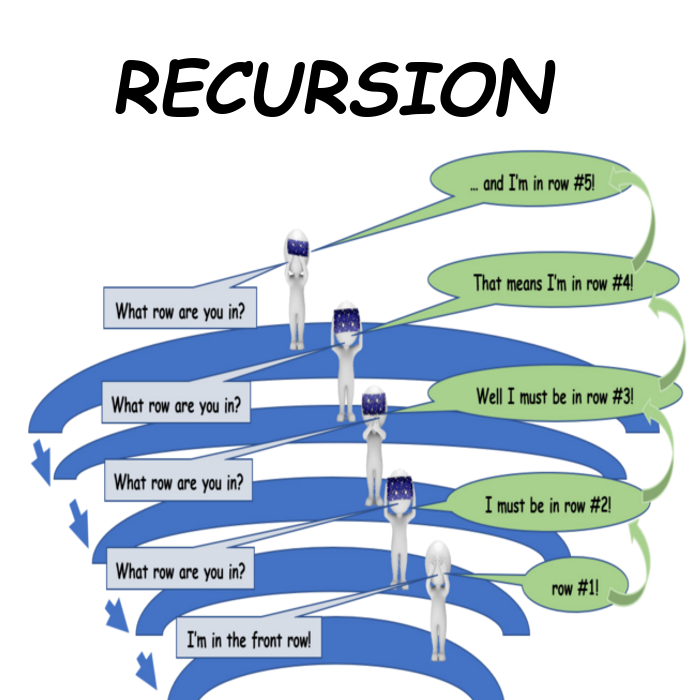
A software engineering technique in which a block of code (method, function) calls itself.
Below, method summer is a recursive method. It adds the values in an array.
public static int summer(int[] nums, int index) {
if (index == 0)
return nums[0];
return (nums[index] + summer(nums, index -1)); }
The condition handled before a recursive call returns to the caller.
// model a(n) = a +(n-1)d
public static int arithmeticSequence(int n, int d, int a) {
// Base case
if (n == 1) {
return a;
}
// Recursive Case
return (arithmeticSequence(n - 1, d, a) + d);
}
The condition that causes the recursive routine to call itself.
// model a(n) = a +(n-1)d
public static int arithmeticSequence(int n, int d, int a) {
// Base case
if (n == 1) {
return a;
}
// Recursive Case
return (arithmeticSequence(n - 1, d, a) + d);
}
Exception thrown when there are too many recursive calls, all of which leave data on the stack.
A stack overflow exception is typically thrown when a base case has been omitted from a recursive solution, and the stack reaches it'slimit.
| 99 |
| ... |
| ... |
| 44 |
| 33 |